
<ImageMaterial>
Adapted from drei’s <Image> component, with additional color processing extras.
A shader-based image material component with auto-cover (similar to css/background: cover).
<script lang="ts"> import Scene from './Scene.svelte' import { Canvas } from '@threlte/core' import { Checkbox, Color, Folder, Pane, Slider } from 'svelte-tweakpane-ui'
let brightness = $state(0) let contrast = $state(0) let negative = $state(false) let hue = $state(0) let saturation = $state(0) let lightness = $state(0) let monochromeColor = $state('#ed8922') let monochromeStrength = $state(0) let textureOverrideEnabled = $state(false) let alphaThreshold = $state(0.5) let alphaSmoothing = $state(0.15)
$effect(() => { hue = 0 saturation = 0 lightness = 0 if (textureOverrideEnabled) { hue = 0.2 saturation = -1 lightness = 0.15 } })</script>
<Canvas> <Scene {alphaSmoothing} {alphaThreshold} {brightness} {contrast} {hue} {lightness} {monochromeColor} {monochromeStrength} {negative} {saturation} {textureOverrideEnabled} /></Canvas>
<Pane title="Image" position="fixed"> <Folder title="Color processing"> <Slider bind:value={brightness} label="brightness" min={-1} max={1} /> <Slider bind:value={contrast} label="contrast" min={-1} max={1} /> <Slider bind:value={hue} label="hue" min={0} max={1} /> <Slider bind:value={saturation} label="saturation" min={-1} max={1} /> <Slider bind:value={lightness} label="lightness" min={-1} max={1} /> <Slider bind:value={monochromeStrength} label="monochromeStrength" min={0} max={1} /> <Color bind:value={monochromeColor} label="monochromeColor" /> <Checkbox bind:value={negative} label="negative" /> </Folder> <Folder title="Color processing with a texture"> <Checkbox bind:value={textureOverrideEnabled} label="enabled" /> <Slider bind:value={alphaThreshold} label="alphaThreshold" min={0} max={1} /> <Slider bind:value={alphaSmoothing} label="alphaSmoothing" min={0} max={1} /> </Folder></Pane>import { Vector2, PlaneGeometry } from 'three'
export class BentPlaneGeometry extends PlaneGeometry { constructor(radius: number, ...args: ConstructorParameters<typeof PlaneGeometry>) { super(...args)
const p = this.parameters const hw = p.width * 0.5 const a = new Vector2(-hw, 0) const b = new Vector2(0, radius) const c = new Vector2(hw, 0) const ab = new Vector2().subVectors(a, b) const bc = new Vector2().subVectors(b, c) const ac = new Vector2().subVectors(a, c) const r = (ab.length() * bc.length() * ac.length()) / (2 * Math.abs(ab.cross(ac))) const center = new Vector2(0, radius - r) const baseV = new Vector2().subVectors(a, center) const baseAngle = baseV.angle() - Math.PI * 0.5 const arc = baseAngle * 2 const uv = this.getAttribute('uv') const pos = this.getAttribute('position') const mainV = new Vector2()
for (let i = 0; i < uv.count; i += 1) { const uvRatio = 1 - uv.getX(i) const y = pos.getY(i) mainV.copy(c).rotateAround(center, arc * uvRatio) pos.setXYZ(i, mainV.x, y, -mainV.y) }
pos.needsUpdate = true }}import { Tween } from 'svelte/motion'
const duration = 100
export class Card { radius = new Tween(0.1, { duration }) scale = new Tween(1, { duration }) zoom = new Tween(1, { duration }) url: string constructor(url: string) { this.url = url }}<script lang="ts" module> const urls: string[] = [ 'https://upload.wikimedia.org/wikipedia/commons/thumb/c/c7/Caravaggio_-_Boy_Bitten_by_a_Lizard.jpg/762px-Caravaggio_-_Boy_Bitten_by_a_Lizard.jpg', 'https://upload.wikimedia.org/wikipedia/commons/thumb/d/d4/The_Large_Plane_Trees_%28Road_Menders_at_Saint-R%C3%A9my%29%2C_by_Vincent_van_Gogh%2C_Cleveland_Museum_of_Art%2C_1947.209.jpg/963px-The_Large_Plane_Trees_%28Road_Menders_at_Saint-R%C3%A9my%29%2C_by_Vincent_van_Gogh%2C_Cleveland_Museum_of_Art%2C_1947.209.jpg', 'https://upload.wikimedia.org/wikipedia/commons/thumb/c/c9/KlimtDieJungfrau.jpg/803px-KlimtDieJungfrau.jpg', 'https://upload.wikimedia.org/wikipedia/commons/thumb/6/6c/The_Denial_of_St._Peter_-_Gerard_Seghers_-_Google_Cultural_Institute.jpg/1024px-The_Denial_of_St._Peter_-_Gerard_Seghers_-_Google_Cultural_Institute.jpg', 'https://upload.wikimedia.org/wikipedia/commons/thumb/b/b9/Antoine_Vollon_-_Mound_of_Butter_-_National_Gallery_of_Art.jpg/935px-Antoine_Vollon_-_Mound_of_Butter_-_National_Gallery_of_Art.jpg', 'https://upload.wikimedia.org/wikipedia/commons/thumb/0/08/De_bedreigde_zwaan_Rijksmuseum_SK-A-4.jpeg/911px-De_bedreigde_zwaan_Rijksmuseum_SK-A-4.jpeg' ] const count = 5 // 4 for each channel + 1 for the texture of all channels const names: string[] = ['Hue(R)', 'Saturation(G)', 'Lightness(B)', 'Alpha(A)']</script>
<script lang="ts"> import { fragmentShader, vertexShader } from './rgbaProcessingTexture' import { BentPlaneGeometry } from './BentPlaneGeometry' import { Card } from './Card.svelte' import { DoubleSide, OrthographicCamera, PerspectiveCamera, Scene, Texture, Uniform, WebGLRenderTarget } from 'three' import { HTML, HUD, ImageMaterial, OrbitControls, Suspense, interactivity, useTexture, useViewport } from '@threlte/extras' import { T, useTask, useThrelte } from '@threlte/core'
let { alphaSmoothing = 0.15, alphaThreshold = 0.5, brightness = 0, contrast = 0, hue = 0, lightness = 0, monochromeColor = '#ed8922', monochromeStrength = 0, negative = false, saturation = 0, textureOverrideEnabled = false }: { alphaSmoothing?: number alphaThreshold?: number brightness?: number contrast?: number hue?: number lightness?: number monochromeColor?: string monochromeStrength?: number negative?: boolean saturation?: number textureOverrideEnabled?: boolean } = $props()
const viewport = useViewport()
const { autoRenderTask, renderer } = useThrelte()
interactivity()
const radius = 1.4 const TAU = 2 * Math.PI
const cards = $derived( urls.map((url) => { return new Card(url) }) )
const uTime = new Uniform(0) const uAlphaTexture = new Uniform<Texture | null>(null) useTexture('/textures/alpha.jpg').then((texture) => { uAlphaTexture.value = texture })
const scene = new Scene() const orthoCamera = new OrthographicCamera(-1, 1, 1 - 1, -1, 1)
const rgbaTextureTarget = new WebGLRenderTarget(256, 256, { count })
const colorProcessingTexture = $derived.by(() => { if (!textureOverrideEnabled) return return rgbaTextureTarget.textures[0] })
for (let i = 0, l = names.length; i < l; i += 1) { const texture = rgbaTextureTarget.textures[i + 1] if (texture) texture.name = names[i] ?? '' }
const { start, stop } = useTask( (delta) => { uTime.value += delta const lastRenderTarget = renderer.getRenderTarget() renderer.setRenderTarget(rgbaTextureTarget) renderer.render(scene, orthoCamera) renderer.setRenderTarget(lastRenderTarget) }, { autoStart: false, before: autoRenderTask } )
$effect(() => { if (!textureOverrideEnabled) return start() return () => { stop() } })
const camera = new PerspectiveCamera()</script>
<T is={camera} makeDefault fov={20} position={[2, 2, 10]}> <OrbitControls autoRotate enableDamping enableZoom={false} /></T>
<T.Mesh attach={scene}> <T.PlaneGeometry args={[2, 2]} /> <T.ShaderMaterial {fragmentShader} {vertexShader} uniforms.uTime={uTime} uniforms.uAlphaTexture={uAlphaTexture} /></T.Mesh>
<HUD> <T.OrthographicCamera makeDefault position.z={5} zoom={120} /> <T.Group position.x={-1 * $viewport.width + 1} position.y={1 * 0.5 * $viewport.height + 1} visible={textureOverrideEnabled} > {#each names as text, index} <T.Group position.x={index}> <T.Mesh> <T.MeshBasicMaterial map={rgbaTextureTarget.textures[index + 1] ?? null} /> <T.PlaneGeometry /> </T.Mesh> <HTML center> <span style:color="white" style:opacity={+textureOverrideEnabled}>{text}</span > </HTML> </T.Group> {/each} </T.Group></HUD>
<Suspense> {#each cards as card, index} {@const r = index / cards.length} {@const v = r * TAU} <T.Mesh scale={card.scale.current} position={[radius * Math.sin(v), 0, radius * Math.cos(v)]} rotation={[0, Math.PI + v, 0]} onpointerenter={(e) => { e.stopPropagation() card.radius.set(0.25) card.scale.set(1.3) card.zoom.set(1.25) }} onpointerleave={(e) => { e.stopPropagation() card.radius.set(0.1) card.scale.set(1) card.zoom.set(1) }} > <T is={BentPlaneGeometry} args={[0.1, 1, 1, 20, 20]} /> <ImageMaterial radius={card.radius.current} side={DoubleSide} transparent url={card.url} zoom={card.zoom.current} {alphaSmoothing} {alphaThreshold} {brightness} {colorProcessingTexture} {contrast} {hue} {lightness} {monochromeColor} {monochromeStrength} {negative} {saturation} /> </T.Mesh> {/each}</Suspense>varying vec2 vUv;uniform sampler2D uAlphaTexture;uniform float uTime;
layout (location = 1) out vec4 gR;layout (location = 2) out vec4 gG;layout (location = 3) out vec4 gB;layout (location = 4) out vec4 gA;
float rand(vec2 n) { return fract(sin(dot(n, vec2(12.9898f, 4.1414f))) * 43758.5453f);}
// https://www.shadertoy.com/view/tljXR1float noise(vec2 p) { vec2 ip = floor(p); vec2 u = fract(p); u = u * u * (3.0f - 2.0f * u);
float res = mix(mix(rand(ip), rand(ip + vec2(1.0f, 0.0f)), u.x), mix(rand(ip + vec2(0.0f, 1.0f)), rand(ip + vec2(1.0f, 1.0f)), u.x), u.y); return res * res;}
#define NUM_OCTAVES 5
float fbm(vec2 x) { float v = 0.0f; float a = 0.5f; vec2 shift = vec2(100); // Rotate to reduce axial bias mat2 rot = mat2(cos(0.5f), sin(0.5f), -sin(0.5f), cos(0.50f)); for (int i = 0; i < NUM_OCTAVES; ++i) { v += a * noise(x); x = rot * x * 2.0f + shift; a *= 0.5f; } return v;}
float hexGrid(float scale) { vec2 u = scale * vUv; vec2 s = vec2(1.f, 1.732f); vec2 a = mod(u, s) * 2.f - s; vec2 b = mod(u + s * .5f, s) * 2.f - s;
return pow(0.5f * min(dot(a, a), dot(b, b)), 3.f) * 2.f;}
void main() { vec2 p = vUv * 0.5f - 1.f; float t = uTime * 0.15f; float rad = atan(p.x, p.y) + t * 0.2f; float hue = fbm(35.f * vec2(cos(rad), sin(rad)) + 30.f * vec2(fbm(p + t), -fbm(p + t))); hue = pow(hue, 2.f);
float saturation = clamp(pow(distance(0.5f, fract((vUv.x + vUv.y) + uTime * 0.2f)), 2.f) * 10.f, 0.f, 1.f);
float lightness = clamp(hexGrid(8.f) * pow(distance(0.5f, fract(vUv.x * 16.f + uTime)), 2.f) * 20.f, 0.f, 1.f);
float alpha = texture2D(uAlphaTexture, vUv).r;
pc_fragColor = vec4(hue, saturation, lightness, alpha); gR = vec4(hue, 0.f, 0.f, 1.f); gG = vec4(0.f, saturation, 0.f, 1.f); gB = vec4(0.f, 0.f, lightness, 1.f); gA = vec4(alpha, alpha, alpha, 1.f);
}import fragmentShader from './fragmentShader.glsl?raw'import vertexShader from './vertexShader.glsl?raw'
export { fragmentShader, vertexShader }varying vec2 vUv;void main() { gl_Position = vec4(position, 1.0f); vUv = uv;}Images from Wikipedia. Carousel originally by Cyd Stumpel.
Example
Section titled “Example”<script lang="ts"> import { DoubleSide } from 'three' import { ImageMaterial } from '@threlte/extras'</script>
<T.Mesh> <T.PlaneGeometry /> <ImageMaterial transparent side={DoubleSide} url="KlimtDieJungfrau.jpg" radius={0.1} zoom={1.1} /><T.Mesh><ImageMaterial> can also be used with instanced or batched meshes.
Color processing effects
Section titled “Color processing effects”The <ImageMaterial /> component offers a range of properties for dynamic color processing.
The properties brightness, contrast, hue, saturation, and lightness adjust the image’s initial values additively.
To decrease brightness, for instance, you would use a negative value, while a positive value would increase it. The hue shift is the only exception,
its values range from 0 to 1, representing a complete cycle around the color wheel. Notably, values 0 and 1 are equivalent, indicating the same hue position.
For the monochrome effect, specify your preferred tint using the monochromeColor property,
and control the effect’s intensity with monochromeStrength.
Setting this strength to 0 disables the effect entirely, while a value of 1 applies it fully,
rendering the image in varying shades of a single color.
Advanced color processing with a texture
Section titled “Advanced color processing with a texture”The colorProcessingTexture property enables advanced color processing by allowing you to specify a texture
that changes the strength and pattern of color effects. It can be used to create dynamic, animated effects as well as static ones that target only
specified image areas.
Each texture channel controls a different color processing effect:
- Red for hue
- Green for saturation,
- Blue for lightness
- Alpha for transparency.
Red, green and blue channels are applied multiplicatively to the values of hue, saturation and lightness.
The alpha channel acts differently, providing a flexible alpha override mechanism, that uses a range of values for
dynamic image reveal effect. With changing the alphaThreshold property, areas with alpha values approaching 1 are revealed first,
followed by regions with values tending towards 0.
To further control this effect, the alphaSmoothing property allows for a gradual fade-in effect within a specified range.
For instance, with an alphaThreshold of 0.5 and an alphaSmoothing set to 0.15, alpha values spanning from 0.5 to 0.65
will smoothly transition into visibility.
Enable “color processing with a texture” in the example on top of this page to see the effect applying RGBA color processing texture can have.
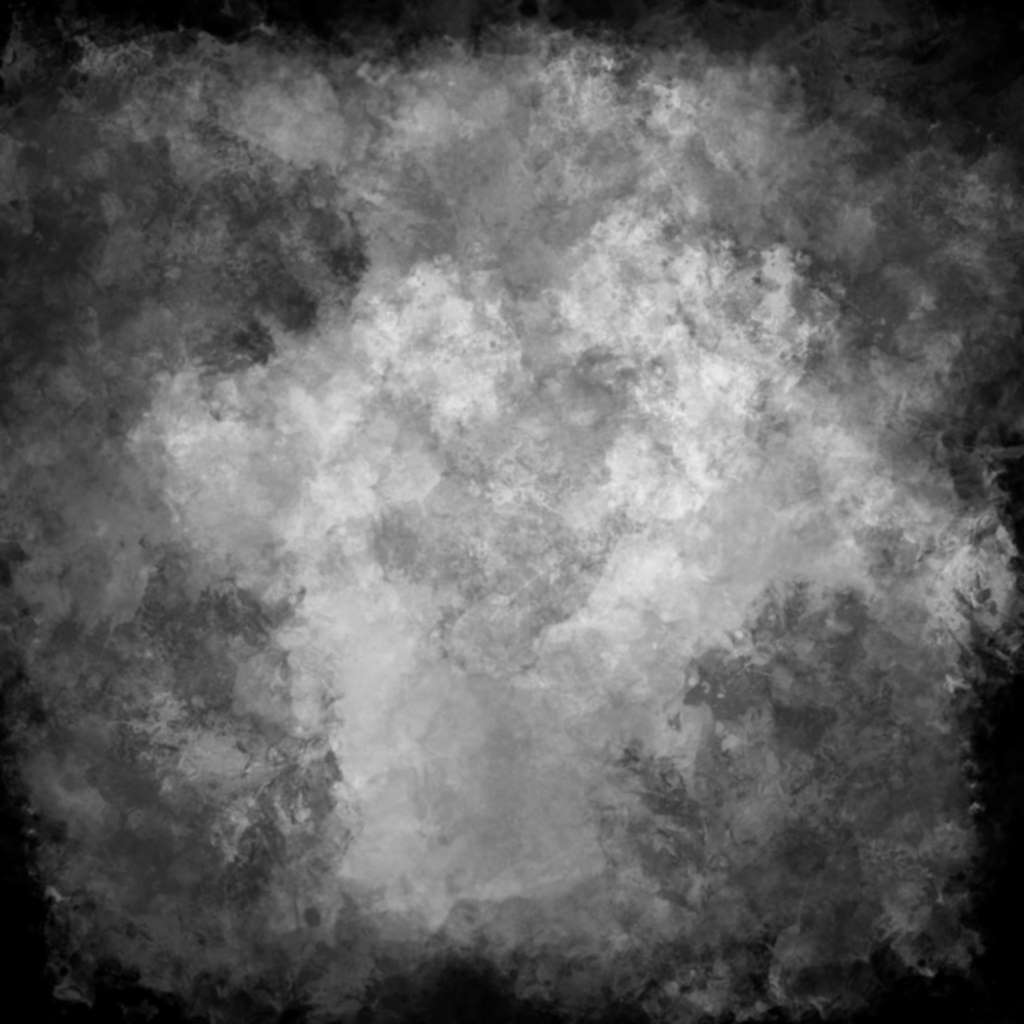
Alpha image used in the example. The lighter values towards the center are revealed first.
Order of processing effects
Section titled “Order of processing effects”- Alpha override
- Brightness
- Contrast
- Hue, Saturation, Lightness
- Monochrome
- Negative
Component Signature
Section titled “Component Signature”
<ImageMaterial> extends
              <

                T

              .

                ShaderMaterial

              >
and supports all its props, snippets, bindings and events.