
<InstancedSprite>
This is an early version - features and API might change significantly over time. Please report any issues you encounter on Discord or Github.
The <InstancedSprite> component allows you to efficiently spawn large numbers of animated
sprites in your scene and update each instance
using the useInstancedSprite hook, or with a <Instance> component available through a slot prop.
You can find an example of a more complex scene here.
<script lang="ts"> import { Canvas, T } from '@threlte/core' import Scene from './Scene.svelte' import Settings from './Settings.svelte' import { OrbitControls } from '@threlte/extras'
let billboarding = $state(false) let fps = $state(10)</script>
<div> <Canvas> <T.PerspectiveCamera makeDefault position.z={14} position.y={6} > <OrbitControls /> </T.PerspectiveCamera>
<Scene {billboarding} {fps} /> </Canvas>
<Settings bind:billboarding bind:fps /></div>
<style> div { height: 100%; }</style><!-- - uses aseprite json loader - one sprite is WASD controlled - uses an untyped useInstancedSprie() hook in UpdaterWalking component -->
<script lang="ts"> import { InstancedSprite, buildSpritesheet } from '@threlte/extras' import WalkingBehaviour from './WalkingBehaviour.svelte'
interface Props { billboarding?: boolean fps: number }
let { billboarding = false, fps }: Props = $props()
const player = buildSpritesheet.fromAseprite( '/textures/sprites/player.json', '/textures/sprites/player.png' )</script>
{#await player then spritesheet} <InstancedSprite {spritesheet} count={1000} playmode={'FORWARD'} {fps} {billboarding} castShadow > <WalkingBehaviour /> </InstancedSprite>{/await}<script lang="ts"> import type { Snippet } from 'svelte' import { T } from '@threlte/core' import { Sky, useTexture } from '@threlte/extras' import { BackSide, NearestFilter, RepeatWrapping, MathUtils } from 'three' import TreeSpriteAtlas from './TreeSpriteAtlas.svelte' import DudeSprites from './DudeSprites.svelte'
interface Props { billboarding?: boolean fps: number children?: Snippet }
let { billboarding = false, fps, children }: Props = $props()
const grass = useTexture('/textures/sprites/pixel-grass.png', { transform: (texture) => { texture.wrapS = texture.wrapT = RepeatWrapping texture.repeat.set(100, 100) texture.minFilter = NearestFilter texture.magFilter = NearestFilter texture.needsUpdate = true return texture } })
const sky = useTexture('/textures/sprites/pixel-sky.png', { transform: (texture) => { texture.wrapS = texture.wrapT = RepeatWrapping texture.repeat.set(10, 2) texture.minFilter = NearestFilter texture.magFilter = NearestFilter texture.needsUpdate = true return texture } })</script>
{@render children?.()}
<!-- Dudes: - Michael's Aseprite loader - One is WASD controlled--><DudeSprites {billboarding} {fps}/>
<!-- Multiple trees in a spritesheet, 1 frame each animation - acting as atlas - not animated --><TreeSpriteAtlas {billboarding} />
<!-- SCENE SETUP: grass, sky, lights -->
{#if $sky} <T.Mesh position.y={-10} scale.y={0.5} > <T.SphereGeometry args={[110]} /> <T.MeshBasicMaterial map={$sky} side={BackSide} /> </T.Mesh>{/if}
{#if $grass} <T.Mesh rotation.x={MathUtils.DEG2RAD * -90} receiveShadow > <T.CircleGeometry args={[110]} /> <T.MeshLambertMaterial map={$grass} /> </T.Mesh>{/if}
<Sky elevation={13.35} />
<T.AmbientLight intensity={1} />
<T.DirectionalLight shadow.mapSize={[2048, 2048]} shadow.camera.far={128} shadow.camera.near={0.01} shadow.camera.left={-20} shadow.camera.right={20} shadow.camera.top={20} shadow.camera.bottom={-20} shadow.bias={-0.0001} position.x={0} position.y={50} position.z={30} intensity={3} castShadow/><script lang="ts"> import { Checkbox, Pane, Slider, ThemeUtils } from 'svelte-tweakpane-ui'
interface Props { billboarding: boolean fps: number }
let { billboarding = $bindable(), fps = $bindable() }: Props = $props()</script>
<Pane theme={ThemeUtils.presets.light} position="fixed" title="InstancedSprite"> <Checkbox bind:value={billboarding} label="billboarding" />
<Slider label="fps" min={1} max={30} step={1} bind:value={fps} /></Pane><!-- - Example of using animations as a static sprite atlas - each frame is named and used as a different tree randomly - to achieve this playmode is "PAUSE" and autoUpdate={false} - the instanced sprite has to be updated once when initialized and then, each time the atlas changes - uses <Instance/> component instead of hook to set positions and frames -->
<script lang="ts"> import { InstancedSprite, buildSpritesheet, type SpritesheetMetadata } from '@threlte/extras' import { AdaptedPoissonDiscSample as Sampler } from './util' import type { Vector3Tuple } from 'three'
interface Props { billboarding?: boolean }
let { billboarding = false }: Props = $props()
const treeAtlasMeta = [ { url: '/textures/sprites/trees-pixelart.png', type: 'rowColumn', width: 8, height: 3, animations: [ { name: 'green_0', frameRange: [0, 0] }, { name: 'green_1', frameRange: [1, 1] }, { name: 'green_2', frameRange: [2, 2] }, { name: 'green_3', frameRange: [3, 3] }, { name: 'green_4', frameRange: [4, 4] }, { name: 'green_5', frameRange: [5, 5] }, { name: 'green_6', frameRange: [6, 6] }, { name: 'green_7', frameRange: [7, 7] }, { name: 'green_8', frameRange: [12, 12] }, { name: 'green_9', frameRange: [13, 13] }, { name: 'green_10', frameRange: [14, 14] }, { name: 'green_11', frameRange: [15, 15] }, { name: 'red_0', frameRange: [8, 8] }, { name: 'red_1', frameRange: [9, 9] }, { name: 'red_2', frameRange: [10, 10] }, { name: 'red_3', frameRange: [11, 11] }, { name: 'red_4', frameRange: [20, 20] }, { name: 'red_5', frameRange: [21, 21] }, { name: 'red_6', frameRange: [22, 22] }, { name: 'red_7', frameRange: [23, 23] }, { name: 'dead_0', frameRange: [16, 16] }, { name: 'dead_1', frameRange: [17, 17] }, { name: 'dead_2', frameRange: [18, 18] }, { name: 'dead_3', frameRange: [19, 19] } ] } ] as const satisfies SpritesheetMetadata
const treeAtlas = buildSpritesheet.from<typeof treeAtlasMeta>(treeAtlasMeta)
const treePositions: Vector3Tuple[] = []
for (let x = 0; x < 5; x++) { for (let z = 0; z < 5; z++) { treePositions.push([x, 0.5, z]) } }
const REGION_W = 600 const REGION_Z = 600
const greenTrees = 11 const redTrees = 7 const deadTrees = 3
const maxRadius = 107
const sampler = new Sampler(4, [REGION_W, REGION_Z], undefined, Math.random)
const points = sampler.GeneratePoints().filter(([x, y]) => { return Math.sqrt(((x ?? 0) - REGION_W / 2) ** 2 + ((y ?? 0) - REGION_Z / 2) ** 2) < maxRadius }) as [number, number][]
const pickRandomTreeType = () => { const rnd = Math.random() if (rnd > 0.97) { return `dead_${Math.floor(deadTrees * Math.random())}` } if (rnd > 0.9) { return `red_${Math.floor(redTrees * Math.random())}` } return `green_${Math.floor(greenTrees * Math.random())}` }
let sprite = $state<any>()
$effect(() => { // manually update once to apply tree atlas // also, flip random trees on X axis for more variety if (sprite) { for (let i = 0; i < points.length; i++) { sprite.flipX.setAt(i, Math.random() > 0.6 ? true : false) } sprite.update() } })</script>
{#await treeAtlas.spritesheet then spritesheet} <InstancedSprite count={points.length} autoUpdate={false} playmode={'PAUSE'} {billboarding} {spritesheet} bind:ref={sprite} castShadow > {#snippet children({ Instance })} {#each points as [x, z], i} {#if i < points.length / 2} <!-- Pick a random tree from atlas via animation name --> <Instance position={[x - REGION_W / 2, 1.5, z - REGION_Z / 2]} id={i} animationName={pickRandomTreeType()} scale={[3, 3]} /> {:else} <!-- Set and freeze a random frame from the spritesheet --> <Instance position={[x - REGION_W / 2, 1.5, z - REGION_Z / 2]} id={i} scale={[3, 3]} frameId={Math.floor(Math.random() * 24)} /> {/if} {/each} {/snippet} </InstancedSprite>{/await}<script lang="ts"> import { useTask } from '@threlte/core' import { useInstancedSprite } from '@threlte/extras' import { Vector2 } from 'three' import { randomPosition } from './util'
const { updatePosition, count, sprite } = useInstancedSprite()
const posX: number[] = Array.from({ length: count }) const posZ: number[] = Array.from({ length: count })
const spawnRadius = 100
for (let i = 0; i < count; i++) { const pos = randomPosition(spawnRadius) posX[i] = pos.x posZ[i] = pos.y }
type Agent = { action: 'Idle' | 'Run' velocity: [number, number] timer: number }
const agents: Agent[] = [] for (let i = 0; i < count; i++) { agents.push({ action: 'Run', timer: 0.1, velocity: [0, 1] }) }
const velocityHelper = new Vector2(0, 0)
const pickAnimation = (i: number) => { const dirWords = ['Forward', 'Backward', 'Left', 'Right'] const agent = agents[i] as Agent
const isHorizontal = Math.abs(agent.velocity[0] * 2) > Math.abs(agent.velocity[1]) ? 2 : 0 const isLeft = agent.velocity[0] > 0 ? 1 : 0 const isUp = agent.velocity[1] > 0 ? 0 : 1
const secondMod = isHorizontal ? isLeft : isUp const chosenWord = dirWords.slice(0 + isHorizontal, 2 + isHorizontal)
const animationName = `${agent.action}${chosenWord[secondMod]}`
return animationName }
const updateAgents = (delta: number) => { for (let i = 0; i < agents.length; i++) { const agent = agents[i] as Agent agent.timer -= delta
// apply velocity posX[i] += agent.velocity[0] * delta posZ[i] += agent.velocity[1] * delta
// roll new behaviour when time runs out or agent gets out of bounds if (agent.timer < 0) { const runChance = 0.6 + (agent.action === 'Idle' ? 0.3 : 0) agent.action = Math.random() < runChance ? 'Run' : 'Idle'
agent.timer = 5 + Math.random() * 5
if (agent.action === 'Run') { velocityHelper .set(Math.random() - 0.5, Math.random() - 0.5) .normalize() .multiplyScalar(3) agent.velocity = velocityHelper.toArray() }
const animIndex = pickAnimation(i) if (agent.action === 'Idle') { agent.velocity = [0, 0] } sprite.animation.setAt(i, animIndex) } } }
useTask((delta) => { updateAgents(delta)
for (let i = 0; i < count; i++) { updatePosition(i, [posX[i] || 0, 0.5, posZ[i] || 0]) } })</script>// Adapted from: https://github.com/SebLague/Poisson-Disc-Sampling// https://www.cs.ubc.ca/~rbridson/docs/bridson-siggraph07-poissondisk.pdf
export class PoissonDiscSample { random: () => number radius: number cellSize: number maxCandidates: number width: number height: number gridHeight: number gridWidth: number grid: number[][] points: [number, number][] spawnPoints: [number, number][]
constructor(radius: number, region: [number, number], maxCandidates: number = 30) { this.random = Math.random
this.radius = radius this.cellSize = radius / Math.SQRT2 this.maxCandidates = maxCandidates
this.width = region[0] this.height = region[1]
this.gridHeight = Math.ceil(this.height / this.cellSize) this.gridWidth = Math.ceil(this.width / this.cellSize)
this.grid = new Array(this.gridHeight) for (let i = 0; i < this.gridHeight; i++) { this.grid[i] = [...new Array(this.gridWidth)].map((_) => 0) }
this.points = [] this.spawnPoints = []
this.spawnPoints.push([this.width / 2, this.height / 2]) }
GeneratePoints(): number[][] { while (this.spawnPoints.length > 0) { // choose one of the spawn points at random const spawnIndex = Math.floor(this.random() * this.spawnPoints.length) const spawnCentre = this.spawnPoints[spawnIndex]! let candidateAccepted = false
// then generate k candidates around it for (let k = 0; k < this.maxCandidates; k++) { const angle = this.random() * Math.PI * 2 const dir: [number, number] = [Math.sin(angle), Math.cos(angle)] const disp = Math.floor(this.random() * (this.radius + 1)) + this.radius const candidate: [number, number] = [ spawnCentre[0] + dir[0] * disp, spawnCentre[1] + dir[1] * disp ]
// check if the candidate is valid if (this.IsValid(candidate)) { this.points.push(candidate) this.spawnPoints.push(candidate) const gridX = Math.ceil(candidate[0] / this.cellSize) - 1 const gridY = Math.ceil(candidate[1] / this.cellSize) - 1 this.grid[gridY]![gridX] = this.points.length candidateAccepted = true break } } // If no candidates around it were valid if (!candidateAccepted) { // Remove it from the spawnpoints list this.spawnPoints.splice(spawnIndex, 1) } } return this.points }
IsValid(candidate: [number, number]) { const cX = candidate[0] const cY = candidate[1] if (cX >= 0 && cX < this.width && cY >= 0 && cY < this.height) { const cellX = Math.ceil(cX / this.cellSize) const cellY = Math.ceil(cY / this.cellSize) const searchStartX = Math.max(0, cellX - 2) const searchEndX = Math.min(cellX + 2, this.gridWidth - 1) const searchStartY = Math.max(0, cellY - 2) const searchEndY = Math.min(cellY + 2, this.gridHeight - 1)
for (let x = searchStartX; x <= searchEndX; x++) { for (let y = searchStartY; y <= searchEndY; y++) { const pointIndex = this.grid[y]![x]! if (pointIndex != 0) { const diff = candidate.map((val, i) => val - this.points[pointIndex - 1]![i]!) // we're not worried about the actual distance, just the equality const sqrdDst = Math.pow(diff[0]!, 2) + Math.pow(diff[1]!, 2) if (sqrdDst < Math.pow(this.radius, 2)) { return false } } } } return true } return false }}
export class AdaptedPoissonDiscSample extends PoissonDiscSample { constructor( radius: number, region: [number, number], maxCandidates: number = 30, random: () => number ) { super(radius, region, maxCandidates) this.random = random this.spawnPoints = [] const x = Math.floor(this.random() * this.width) const y = Math.floor(this.random() * this.height) this.spawnPoints.push([x, y]) }}
export const randomPosition: any = (radius = 100) => { const x = (Math.random() - 0.5) * radius * 2 const y = (Math.random() - 0.5) * radius * 2
if (Math.sqrt(x ** 2 + y ** 2) > radius) { return randomPosition() }
return { x, y }}<InstancedSprite>
Section titled “<InstancedSprite>”To use the <InstancedSprite> you must provide it with sprite metadata and a texture. While we recommend utilizing the
buildSpritesheet() utility for this purpose, you are also free to implement your own
custom solution, provided it meets the component’s input requirements.
Other than it’s own props, <InstanedSprite/> extends and accepts all properties of
Three.js instanced mesh, such as castShadow, frustumCulled etc.
<InstancedSprite bind:ref {spritesheet} count={500} playmode={'FORWARD'} fps={9} billboarding hueShift={{ h: 1.5, s: 0.9, v: 1 }} randomPlaybackOffset={2000} castShadow/>Required props
Section titled “Required props”| Prop | description |
|---|---|
count | number of instances |
spritesheet | Object with spritesheet metadata and a texture {spritesheet: SpritesheetFormat, texture: Texture} |
Optional props
Section titled “Optional props”| Prop | description |
|---|---|
autoUpdate | Update animations automatically. It should stay true for most usecases. Setting to false is most commonly used in case of static sprites but it can also be used for advanced manual animation updates. |
billboarding | Sets the default global billboarding (sprites always facing the camera) state that is used unless the setAt was called on the instance. |
playmode | Sets playmode for all instances. "FORWARD" | "REVERSE" | "PAUSE" | "PINGPONG" |
fps | The desired frames per second of the animation |
alphaTest | Sets the alpha value to be used when running an alpha test |
transparent | Whether or not the material should be transparent |
randomPlaybackOffset | Offset each sprite’s animation timer by a random number of milliseconds. If true, randomness is within 0-100ms range. Providing the prop with a number sets the upper range of the offset - randomPlaybackOffset={2000} means that the animation will be offset by 0-2000ms |
hueShift | Changes sprite look by tweaking the material’s output color by a provided hueShift, saturation and vibrance {h: number, s: number, v:number} |
You create and update instances in three ways:
- Utilizing the
useInstancedSprite()hook (recommended approach). - Using the
<Instance>component offered through a slot prop. - Directly with the underlying class using the
refbinding.
useInstancedSprite
Section titled “useInstancedSprite”The hook has to be used in a child component of <InstancedSprite> and returns an object with following properties:
count: Total number of instances.updatePosition(id: number, position: Vector3Tuple, scale?: Vector2Tuple): A utility function for updating an instance’s position and scale.animationMap: A writable store (Writable<Map<string, number>>) that maps animation names to their corresponding IDs. Animation names are useful to have for setting a random animation from a pool etc. The IDs are reserved for more advanced usecases.sprite: Provides direct access to theInstancedSpriteMesh, enabling updates to instance properties such as animations, billboarding, and play mode.
import { useInstancedSprite } from '@threlte/extras'
const hook = useInstancedSprite()// it's useful to immediately destructure it like thisconst { updatePosition, count, animationMap, sprite } = useInstancedSprite()
// Examples of using the InstancedSpriteMesh API:
// play animation on instance id 0 - loops by defualtsprite.play('IdleBackward').at(0)// play animation without loopingsprite.play('RunLeft', false).at(1)// play animation backwards with loopingsprite.play('RunLeft', true, 'REVERSE').at(2)
// mesh.play is a utility that combines the use of these functions:// animation by namesprite.animation.setAt(0, 'RunBackward')// looping y/nsprite.loop.setAt(0, false)// animation direction - FORWARD (default) / REVERSE / PAUSEsprite.playmode.setAt(0, 'REVERSE')
// billboardingsprite.billboarding.setAll(true)sprite.billboarding.setAt(0, true)Typescript support
Section titled “Typescript support”The useInstancedSprite hook supports typing for autocompletion of animation names:
type AnimationNames = 'walk' | 'run' | 'idle' | 'fly'const { updatePosition, count, animationMap, sprite } = useInstancedSprite<AnimationNames>()<Instance>
Section titled “<Instance>”Instance is a slot prop component that is used to update sprite instances properties. You can gain access to it with the Instance snippet prop on InstancedSprite component.
Then put it as a child component. The only required property is id. It also has position of type Vector3Tuple prop and scale of type Vector2Tuple.
Other than this, it as other properties that you can find in the InstancedSpriteMesh, so: animationName, playmode, billboarding, offset, loop,
flipX, flipY, frameId. Read more about them in the InstancedSpriteMesh section
The <Instance> component serves as a declarative alternative to useInstancedSprite hook to dynamically update the properties of sprite instances within the
InstancedSprite component. You can access through the Instance snippet prop.
Example: Set a position, scale and flipX for every instance.
<InstancedSprite count={10000} {spritesheet}> {#snippet children({ Instance })} {#each { length: 10000 } as _, i} <Instance position={[Math.random() * 100, Math.random() * 100, Math.random() * 100]} scale={[3, 3]} flipX id={i} /> {/each} {/snippet}</InstancedSprite><Instance> Props
Section titled “<Instance> Props”Props
binding
Section titled “binding”The InstancedSpriteMesh class is the foundation behind the <InstancedSprite> component, written to enable efficient instancing of animated sprites within a
Three.js environment. The <InstancedSprite> component lets you bind to it through ref.
The class extends the capabilities of the troika’s InstancedUniformsMesh. For an in-depth exploration of InstancedSpriteMesh and its features, refer to the documentation available at InstancedSpriteMesh docs.
Spritesheets
Section titled “Spritesheets”SpritesheetMetadata
Section titled “SpritesheetMetadata”Object used in buildSpritesheet function has to be compliant with the SpritesheetMetadata type format. This type is structured to
accommodate the metadata for one or multiple sprite files within a single spritesheet.
type SpritesheetMetadata = { url: string type: 'rowColumn' | 'frameSize' width: number height: number animations: { name: string frameRange: [number, number] }[]}[]Understanding SpritesheetMetadata
Section titled “Understanding SpritesheetMetadata”A SpritesheetMetadata is an array, with each entry representing metadata fields for one sprite:
url: Specifies the path or URL to the sprite image file.type: Determines the method of defining the spritesheet dimensions. Type"rowColumn"specifies the layout in terms of rows and columns within the image, and type"frameSize"instead defines the size of each frame, allowing the utility to calculate the layout.widthandheight: Depending on type, these refer to the number ofcolumnsandrows("rowColumn") or the dimensions of a single frame ("frameSize").animations: An array detailing the animations, where each animation has a name and aframeRange. TheframeRangeis a tuple marking the start and end frames of the animation.
Typesafety
Section titled “Typesafety”For improved developer experience when working with TypeScript, it is strongly recommended to use as const assertion in
combination with satisfies SpritesheetMetadata. This approach not only ensures compliance with the SpritesheetMetadata
type but also enables autocompletion for animation names within utility functions, which is highly recommended:
buildSpritesheet()
Section titled “buildSpritesheet()”buildSpritesheet() is a utility function for building a final texture and spritesheet object from a provided SpritesheetMetadata object or external source.
Each buildSpritesheet method return an Promise that and has to be awaited. Promise returned by each method contains an object with a spritesheet
ready for use in <InstancedSprite>.
buildSpritesheet().from(meta: SpritesheetMetadata)
Section titled “buildSpritesheet().from(meta: SpritesheetMetadata)”Other than spritesheet promise, it also returns a useInstancedSprite hook. This hook can be enhanced with
extra typescript support for autocompletion of animation names as such:
const meta = [ { url: '/textures/sprites/cacodaemon.png', type: 'rowColumn', width: 8, height: 4, animations: [ { name: 'fly', frameRange: [0, 5] }, { name: 'attack', frameRange: [8, 13] }, { name: 'idle', frameRange: [16, 19] }, { name: 'death', frameRange: [24, 31] } ] }] as const satisfies SpritesheetMetadata
const result = buildSpritesheet.from<typeof meta>(meta)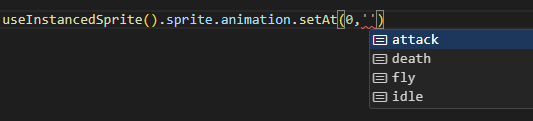
buildSpritesheet().fromAseprite(asepriteDataUrl: string, spriteImageUrl: string)
Section titled “buildSpritesheet().fromAseprite(asepriteDataUrl: string, spriteImageUrl: string)”Similar to above, but it parses the Aseprite metadata json into the correct format. Does not provide any additional utilities.
Examples
Section titled “Examples”Multiple animations
Section titled “Multiple animations”const demonSpriteMeta = [ { url: '/textures/sprites/cacodaemon.png', type: 'rowColumn', width: 8, height: 4, animations: [ { name: 'fly', frameRange: [0, 5] }, { name: 'attack', frameRange: [8, 13] }, { name: 'idle', frameRange: [16, 19] }, { name: 'death', frameRange: [24, 31] } ] }] as const satisfies SpritesheetMetadataMultiple files
Section titled “Multiple files”const goblinSpriteMeta = [ { url: '/textures/sprites/goblin/Attack.png', type: 'rowColumn', width: 8, height: 1, animations: [{ name: 'attack', frameRange: [0, 7] }] }, { url: '/textures/sprites/goblin/Death.png', type: 'rowColumn', width: 4, height: 1, animations: [{ name: 'death', frameRange: [0, 3] }] }, { url: '/textures/sprites/goblin/Idle.png', type: 'rowColumn', width: 4, height: 1, animations: [{ name: 'idle', frameRange: [0, 3] }] }] as const satisfies SpritesheetMetadataStatic sprites & Atlassing
Section titled “Static sprites & Atlassing”This component focuses on targetting animated sprites, but it’s possible to use it for static images as well. If each frame of the spritesheet is a separate animation, then it effectively acts as an atlas with named sprites.
The <Tree/> component in the example above does this.
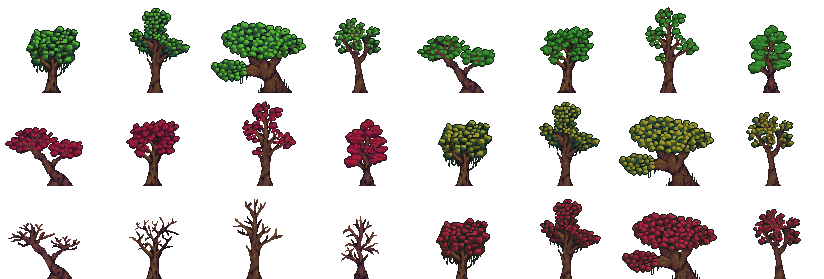
Set autoUpdate={false} on static components and only update it manually with sprite.update(). This has to be done when the InstancedSprite is initiated or when spritesheet or atlas change.
If you don’t do it, then the spritesheet will run animation updates each frame to run animations that don’t really exist.